Attention / 注意
Use your desktop/laptop computer (Use Google Chrome: https://www.google.cn/chrome/) ,do not use your tablet computer/smartphone to operate in the system to avoid bugs.
请使用你的台式或笔记本电脑(使用谷歌浏览器:https://www.google.cn/chrome/),不要使用你的平板电脑或智能手机在系统中操作,以避免错误发生。
Before course selection: activate your NetID / 选课之前:激活你的NetID
NetID is the only identity verification account during your postgraduate study. It can be used to log in to many official websites of Xi'an Jiaotong University. Before course selection, you must activate it first.
NetID是你在校期间唯一的身份认证账户,可以登录学校多个官方网站。在选课之前,你必须首先激活它。
Step 1: Log in the Information Management system for postgraduate (http://gmis.xjtu.edu.cn) ,then select "Student Login" ,and then click "New user authentication".
第1步:登录研究生信息管理系统(http://gmis.xjtu.edu.cn),然后选择“学生登录”,然后点击“新用户认证”。
Step 2: Fill in the basic information, bind the security method and set the login password, and finally return to the login page to enter the system.
第2步:填写基础信息,绑定安全方式并设置登录密码,最后返回登录页进入系统。
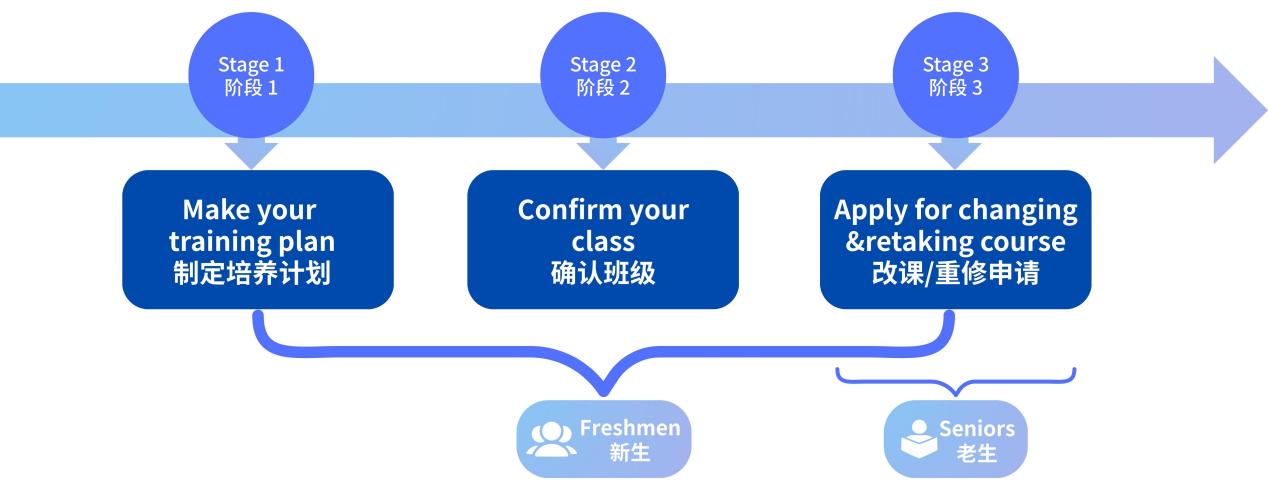
Stage 1* Make your training plan / 阶段1*制定培养计划
Under the guidance of your supervisor, make your personalized training plan, including courses and compulsory modules.
在导师的指导下,制定你的个性化培养计划,包括课程和必修环节。
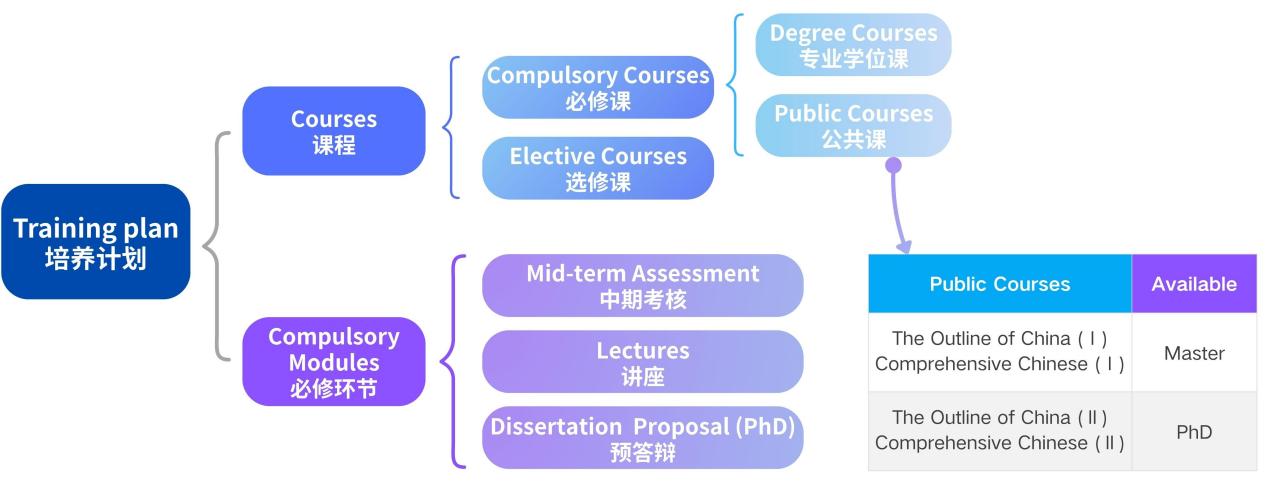
Step 1: Click "Design training plan". After reading the course selection guide, click "Read" to enter the page for making the training plan. Select public and degree courses first and then elective courses to meet the minimum credit requirements for each module.
※Example: "第2组,选16分" means that you need to choose at least 16 credits in the second group of courses.
第1步:点击“培养计划制定”。阅读选课指南后,点击“已阅读”进入培养计划制定页面。先选择公共课和学位课,再选择选修课,满足每个模块的最低学分要求。
※例:“第2组,选16分”的意思是,你需要在第2组课程中至少选择16个学分。
Step 2: If the elective course you want to select is not shown in the list, you can click "Add courses" and select the course. You can also select the extra degree courses as elective courses here.
第2步:如果你想选择的选修课没有在列表中显示, 你可以点击“添加课程”然后选择课程。你也可以在这里将额外的学位课选为选修课。
Step 3: Lastly, submit the training plan to your supervisor for review. After the supervisor's approval, your major school will make the final review. If your supervisor or major school does not approve, you need to modify in accordance with the comments then submit again. You can confirm the class only after your major school's approval.
第3步:最后,提交培养计划给你的导师审核,导师同意后,你的学院将进行终审。如果导师或学院不同意,你需要按照意见修改并再次提交。只有学院同意后,你才可以确认班级。
Stage 2* Confirm your class / 阶段2*确认班级
You need to confirm class every semester. Once the class is confirmed, the schedule and classroom of the course is fixed.
你需要每学期确认班级。班级确认后,上课时间和教室就确定了。
Step 1: Click "Confirm Class", and the page will show the time and classroom of the courses in your training plan. Click "Select Class 选班" to confirm that you want to participate in this course offered in the new semester.
第1步:点击“确认班级”,页面将会显示你的培养计划中课程的时间地点,点击“选班”以确认你要在新学期参与这门课程。
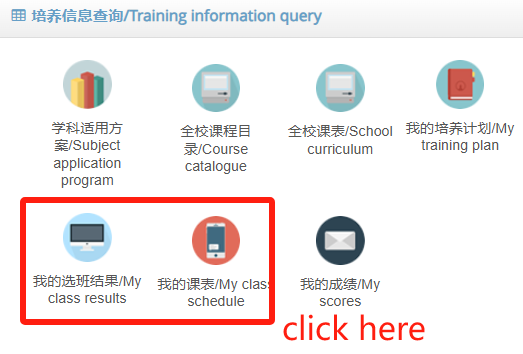
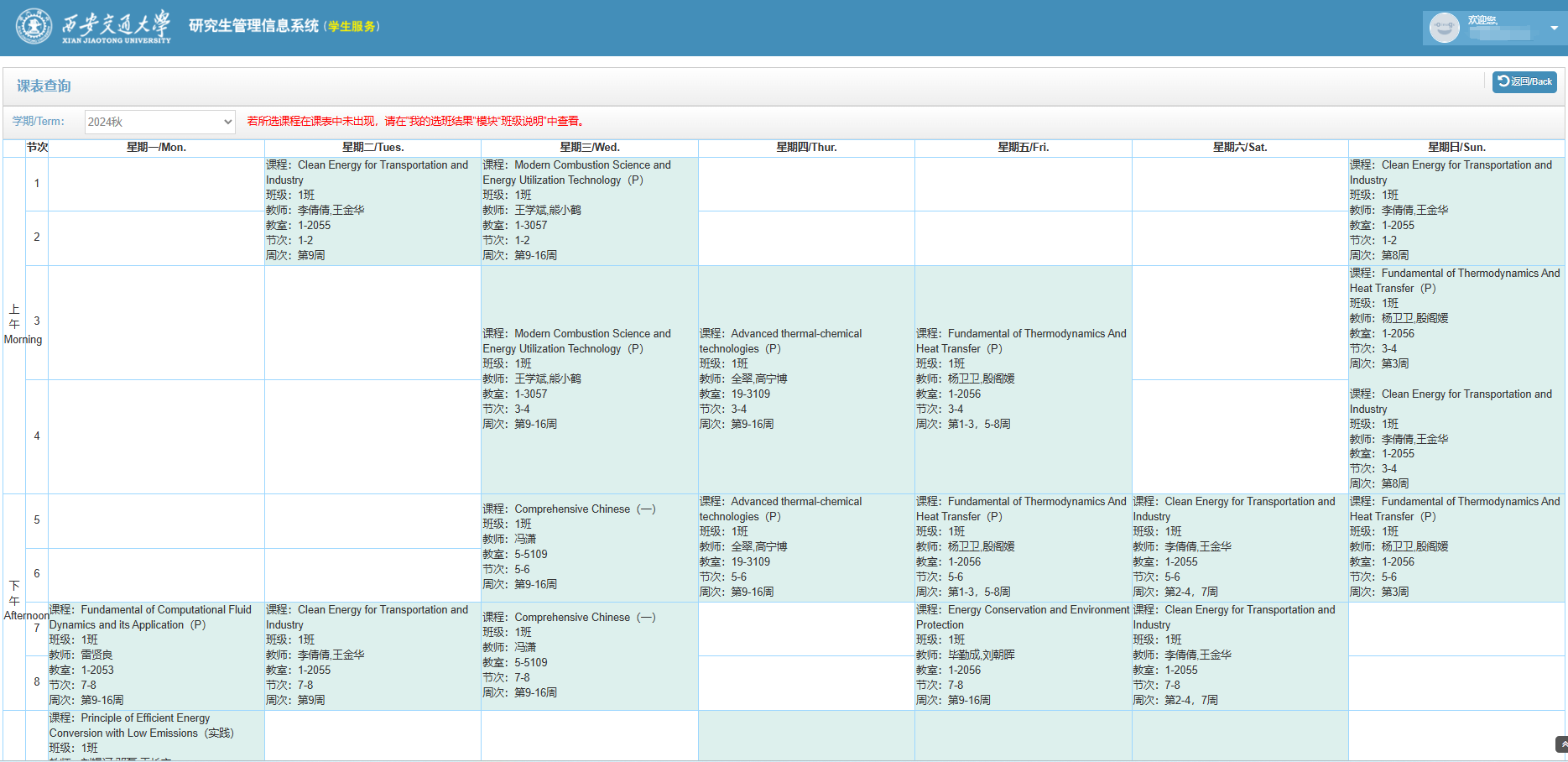
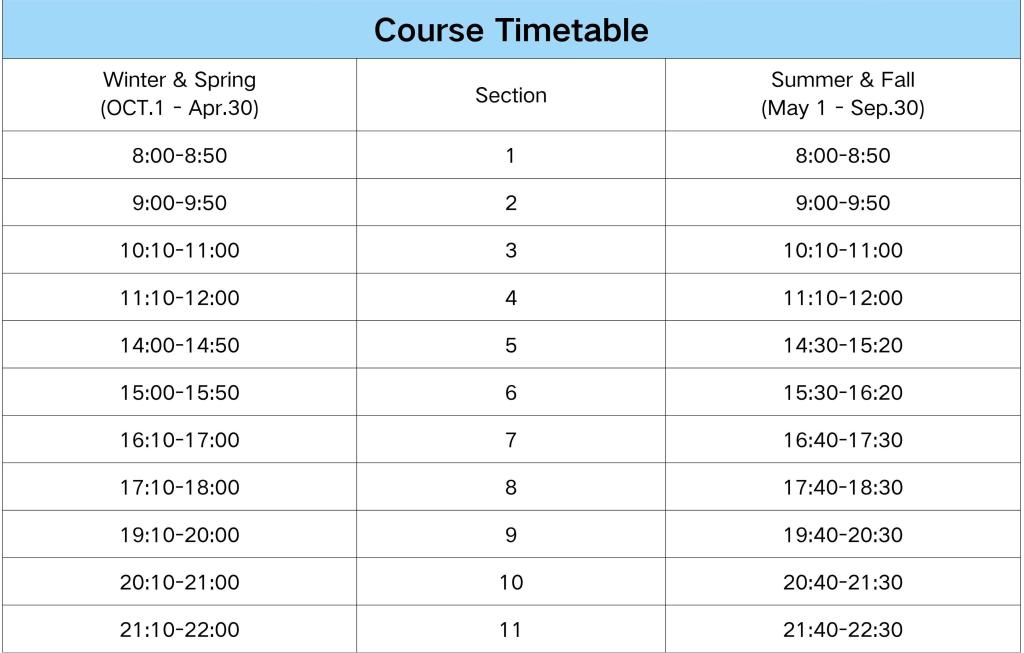
Step2: After confirming your class, please be sure to check the latest class schedule. The corresponding relationship between sections and time is shown in the picture below.
第2步:完成确认班级后,请务必查看最新课表。节次和时间的对应关系请看下方图片。
Stage 3* Apply for changing & retaking course / 阶段3*改课/重修申请
You can change your training plan, adding or dropping courses at this stage. However, please note that no adjustment application (including change the course type) will be allowed after two weeks from the beginning of the course.
这一阶段可以调整你的培养计划,包括新增与删除。但请务必注意,开课两周以上的课程不予调整(包括课程性质)。
You should retake the courses if you fail (less than 60 points) in the exam, otherwise, you won't be able to apply for a degree. Passed courses cannot be retaken. Courses have scored can't be deleted. All the selected courses will appear on your transcript.
如果你得到了不及格成绩(60分以下),需要重修课程,否则你将无法申请学位。通过的课程不得重修。有分数的课程不得删除。所有选择的课程都会出现在你的成绩单上。
Step 1: Click "Apply for changing course or retaking course", and click the "Apply" button on the top right corner to make a new application.
第1步:点击“改课/重修申请”,在右上角点击“申请”新建申请。
Step 2: Click the type, select the course, fill in the application reason, and submit it to your supervisor and major school for review. If you need to adjust your courses and your credits just meet the minimum requirements, before deleting a course, be sure to add one and ensure that it has been approved by your major sc.
第2步:点击调整类型,选择课程并填写申请原因,提交给导师和学院审核。如果你要调整课程且你的学分刚好满足最低要求,在删除一门课程前,请务必先增加一门课程并确保它已被学院审核通过。
Contact information / 联系方式
School teaching secretary and instructor / 学院教学秘书和辅导员
School学院 |
Teachingsecretary教学秘书 |
Instructor辅导员 |
Mechanical Engineering 机械工程学院 |
Li Ruiping 李瑞萍 📞029-88964801 ✉️lrping@xjtu.edu.cn 🏫Building 2-2050, iHarbour |
Ding Yang 丁洋 📞029-82668017 ✉️1694471806@qq.com 🏫Foreign Language Building A911, Xingqing |
Materials Science 材料科学与工程学院 |
Zhang Xiaoxue 张晓雪 📞029-82665286 ✉️su.hui@xjtu.edu.cn 🏫Zhongying Building A221, Xingqing |
|
Life Science and Technology 生命科学与技术学院 |
Liu Yunke 刘云柯 📞029-88968367 ✉️liuyunke@xjtu.edu.cn 🏫Building 18-3042, iHarbour |
|
Physics 物理学院 |
Guo Xiaoai 郭小艾 📞029-82663899 ✉️xiaoaiguo@xjtu.edu.cn 🏫Zhongying Building B204, Xingqing |
|
Chemistry 化学学院 |
Chang Wen 常雯 📞029-88963916 ✉️chang.wen@xjtu.edu.cn 🏫Building 19-2120, iHarbour |
|
Economics and Finance 经济与金融学院 |
Zhang Tingting 张婷婷 📞029-88966906 ✉️zhang.ting63@foxmail.com 🏫Building 5-8005, iHarbour |
Fan Yuchen 范宇晨 📞029-82668017 ✉️fyuchen1989@163.com 🏫Foreign Language Building A911, Xingqing |
Jinhe Center 金禾经济中心 |
Zheng Liping 郑丽萍 📞029-88967920 ✉️zhengliping@mail.xjtu.edu.cn 🏫Building 5-5070, iHarbour |
|
Frontier Institute of Science and Technology 前沿科学技术研究院 |
Xiong Tingting 熊婷婷 📞029-88965131 ✉️xtingting@mail.xjtu.edu.cn 🏫Building 19-2049, iHarbour |
|
Foreign Studies 外国语学院 |
Zuo Jia 左佳 📞029-88965499 ✉️zuojia@xjtu.edu.cn 🏫Building 5-5080, iHarbour |
|
Journalism and New Media 新闻与新媒体学院 |
LiuYanjun 刘妍君 📞029-82663889✉ 1157069918@qq.com 🏫Main Building E1409,Xingqing |
|
Electronic and Information Engineering 电子与信息学部 |
Yin Xiuhong (master) 尹秀红(硕士) 📞029-88968458 ✉️yinxh@mail.xjtu.edu.cn Chang Xiaoru (PhD) 常晓茹(博士) 📞029-88968663 ✉️changxr@xjtu.edu.cn 🏫Building 4-8005, iHarbour |
Cai Xinyan 蔡鑫妍 📞029-82668017 ✉️caixinyan@xjtu.edu.cn 🏫Foreign Language Building A911, Xingqing |
Software Engineering 软件学院 |
Zhang Leqi 张乐琪 📞029-88963268 ✉️lizzie525@xjtu.edu.cn 🏫Building 4-2164, iHarbour |
|
Electrical Engineering 电气工程学院 |
Shen Yanhui 申燕辉 📞029-88964000 ✉️shenyanhui7687@163.com 🏫Building 3-2086, iHarbour |
|
Human Settlements and Civil Engineering 人居环境与建筑工程学院 |
Guo Yin 郭愔 📞029-88965105 ✉️rjjw@mail.xjtu.edu.cn 🏫Building 19-1017, iHarbour |
|
Management 管理学院 |
Xu Shan 许珊 📞029-88963510 ✉️xushan312@mail.xjtu.edu.cn 🏫Building 5-7092, iHarbour |
Zhou Meng 周蒙 📞029-82668017 ✉️zm792154563@163.com 🏫Foreign Language Building A911, Xingqing |
Public Policy and Administration 公共政策与管理学院 |
Yan Lihua (master) 闫立华(硕士) 📞029-88965216 ✉️ylihua@xjtu.edu.cn Li Fei (PhD) 李菲(博士) 📞029-88965934 ✉️lifei@mail.xjtu.edu.cn 🏫Building 5-6069, iHarbour |
|
Energy and Power Engineering 能源与动力工程学院 |
Gao Ziqi 高子琪 📞029-88968710 ✉️zqgao7283@xjtu.edu.cn 🏫Building 1-5195, iHarbour |
Li Jing 李晶 📞029-82668017 ✉️lijing0528@xjtu.edu.cn 🏫Foreign Language Building A911, Xingqing |
Chemical Engineering and Technology 化学工程与技术学院 |
Zhou Ting 周婷 📞029-88968361 ✉️tingzhou@mail.xjtu.edu.cn 🏫Building 19-2191, iHarbour |
|
Aerospace Engineering 航天航空学院 |
Wang Qingyi 王清漪 📞029-88968754 ✉️qingyiwang@xjtu.edu.cn 🏫Building 2-6080, iHarbour |
|
Mathematics and Statistics 数学与统计学院 |
Song Qi (master) 宋琦(硕士) 📞029-88960086 ✉️sxsongqi@xjtu.edu.cn Liu Yixin (PhD) 刘一心(博士) 📞029-88960086 ✉️mathgrad@mail.xjtu.edu.cn 🏫Building 4-2016, iHarbour |
|
Law 法学院 |
Gao Yizhe 高逸哲 📞029-88968323 ✉️gaoyizhe@mail.xjtu.edu.cn 🏫Building 5-3007, iHarbour |
|
Marxism 马克思主义学院 |
Lv Puye 吕蒲叶 📞029-82668187 ✉️myjw@mail.xjtu.edu.cn 🏫Main Building E513, Xingqing |
|
Humanities and social science 人文社会科学学院 |
Wu Qiong (master) 吴琼(硕士) 📞029-82665292 ✉️wuqiong7@xjtu.edu.cn Chang Lingfang (PhD) 常龄方(博士) 📞029-82665292 ✉️rwky@mail.xjtu.edu.cn 🏫Main Building E708, Xingqing |
|
Health Science 医学部 |
Tian Jiaxin 田佳昕 📞029-82655318 ✉️tianjx@mail.xjtu.edu.cn 🏫Medical Administration Building 118, Yanta |
Zhao Ting 赵婷 📞029-82655450 ✉️zhaot2008@xjtu.edu.cn 🏫North Building in Living area 2-1, Yanta |
2. Staff of the Graduate School / 研究生院工作人员
Business业务 |
Responsibie staff负责人 |
Public course selection 公共课选课 Public course score review & publish 公共课成绩审核&发布 |
Su Hui 苏珲 📞029-88960037 ✉️gs-academicaffairs@xjtu.edu.cn 🏫Building 5-3051, iHarbour |
Course evaluation 课程评教 |
Peng Chaonan 彭超楠 📞029-88964184 ✉️pengchn@xjtu.edu.cn 🏫Building 5-3051, iHarbour |
Common system / 常用系统
1.西安交通大学研究生思源学习空间(iSpace)
Website网址:https://ispace.xjtu.edu.cn/
You can watch the course videos here and complete the classroom interactions initiated by the teacher.
你可以在这里观看课程录播,并参与任课教师发起的课堂互动。
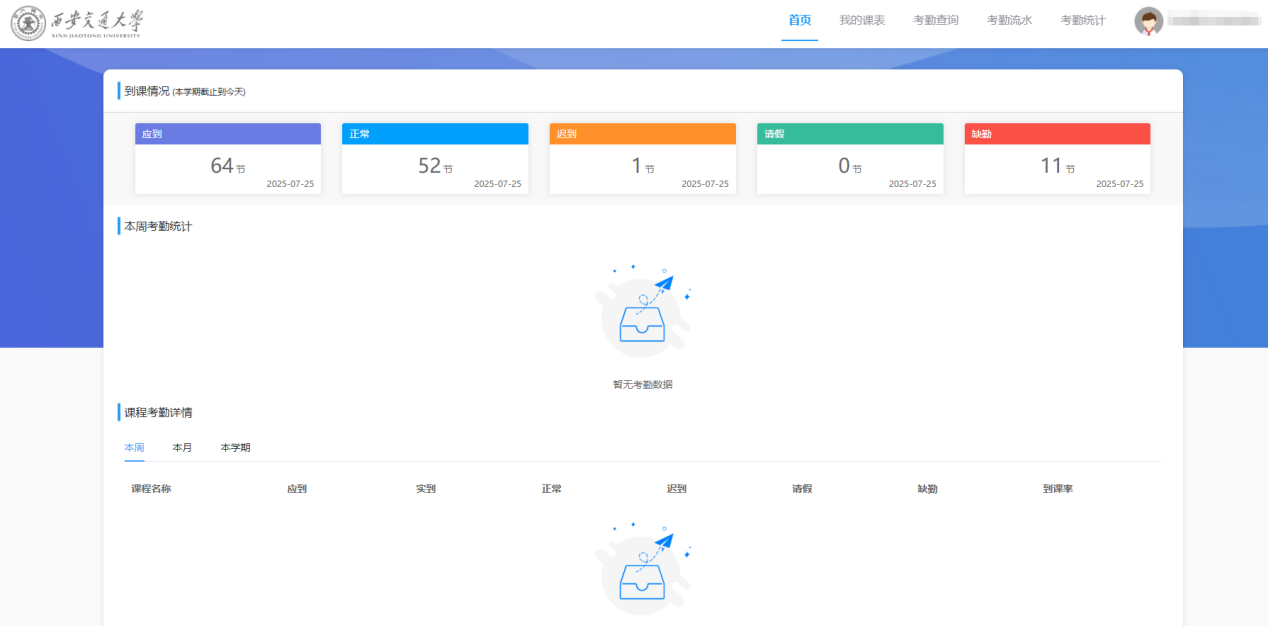
2.西安交通大学研究生考勤系统(Course attendance)
Website网址:http://yjskq.xjtu.edu.cn/
You can check your attendance record here.
你可以在这里查看课程出勤记录。
3.西安交通大学研究生综合评教系统(Course evaluation)
Website网址:http://gste.xjtu.edu.cn/
At the end of the course, you need to evaluate the course you participated in, otherwise, you won't be able to see the score that the teacher has submitted.
在课程结束后,你需要评价你参与的课程,否则,你将无法看到任课教师提交的成绩。
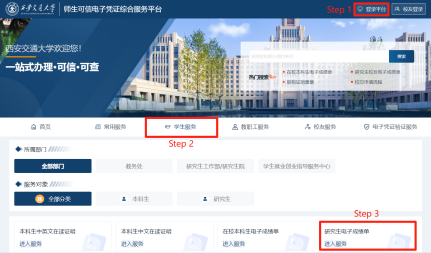
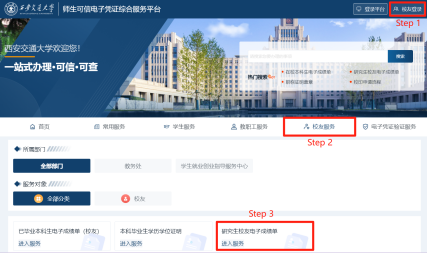
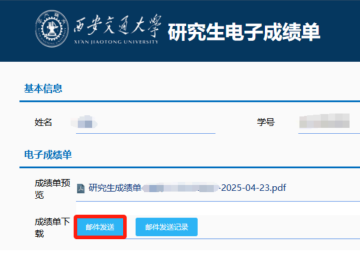
4.西安交通大学可信服务平台(E-transcript Application)
Website网址:https://dzpz.xjtu.edu.cn/
You can download the electronic transcript here or send it to the designated email address via the official email of Xi 'an Jiaotong University by yourself.
你可以在这里下载电子成绩单,或自助通过西安交通大学的官方邮箱向指定邮箱发送电子成绩单。
|
|
|
Students in school |
Schoolmate |
Sent an e-mail |





